
PEW-1x00
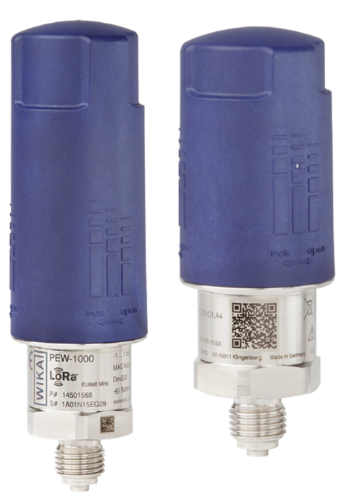
Description of the device
The model PEW-1x00 is a radio-based pressure sensor for monitoring liquids and gases. It uses the licence-free LoRaWAN® and Bluetooth® radio standards and is used, for example, on mobile equipment and remote measuring points. Thanks to intelligent measurement and transmission control and a replaceable battery, the sensor can be operated for years without maintenance. The intelligent configuration allows measurement and transmission intervals that are dependent on the measured value. In addition, the sensor can measure continuously without transmitting every measured value. This means: high safety with low data and energy consumption. All data is available digitally in a cost-efficient way and allows automated analyses. Thanks to numerous process connections and the two available standards − LoRaWAN® for the kilometre range and Bluetooth® for the metre range − the pressure sensor can be flexibly configured. Via retrofit, machinery or moving parts can be configured smartly − without having to plan and document cable routing. Particularly when no continuous measurement is needed, cost advantages can be realised. The model PEW-1x00 is built to be robust and shockresistant. Thanks to IP65, it is well protected against dust and splash water. The battery is preassembled and can be replaced easily. It is not necessary to replace the entire pressure sensor. The sensor enables simple condition monitoring. A temperature indication, in addition to the pressure value, reveals possible malfunctions due to wear or system faults at an early stage and thus reduces the risk of downtime and damage.
For more information see product site.
PEW Parser Quick Start
Parser API
All functions are pure (no global mutation) except adjustMeasuringRange which updates internal range configuration for subsequent decodes.
Types:
Input types:
interface UplinkInput {
  bytes: number[] // Raw payload as array of unsigned bytes (0-255)
  fPort: number // LoRaWAN FPort
  recvTime: Date
}

interface HexUplinkInput {
  bytes: string // Raw payload as hex-encoded string (case-insensitive, even length)
  fPort: number // LoRaWAN FPort
  recvTime: Date
}
Return type (shared by all decode helpers):
type Result = {
  data: Record<string, any> // Parsed key/value pairs
  warnings?: string[] // Non-fatal anomalies
} | {
  errors: string[] // Fatal or structural issues only
}
To understand the data field, take a look at the examples and the schema definition.
Supported channels to identify different sensors by:
// Is used in the returned data
type ChannelName = 'pressure' | 'device temperature'
Channels that support adjusting the measurement range:
type AdjustableChannelName = 'pressure'Important note: PEW TULIP2 delivers battery voltage as part of the decoded measurement output, but that does not make it a real formal parser channel.
- Only
pressureanddevice temperatureare formal parser channels - In
TULIP2, battery voltage is delivered as measurement telemetry in decoded uplink output - That battery voltage value is still not a real configurable or adjustable channel
- Battery voltage is not a configurable channel and must not appear as a
channel2configuration target adjustMeasuringRange('pressure', ...)only applies to the real configurable pressure channel
Channel Configuration:
| Channel Name | Default Min | Default Max | Unit | Configurable |
|---|---|---|---|---|
pressure | 0 | 10 | bar/psi/MPa | Yes |
device temperature | -45 | 110 | °C | No |
*Unit depends on device configuration. Check device specifications or identification frames for actual unit and range.
decodeUplink(input)
function decodeUplink(input: UplinkInput): ResultdecodeHexString(hexInput)
function decodeHexString(hexInput: HexUplinkInput): DecodeResultbytes must have even length; case-insensitive.
adjustMeasuringRange(channel, range)
// Will throw on invalid channel name or if the channel disallows range updates
function adjustMeasuringRange(
  channelName: AdjustableChannelName,
  range: {
    start: number
    end: number
  }
): void
Applies to future decodes only.
adjustRoundingDecimals(decimals)
// Smartly adjust number of decimals for rounded values
// Impacts all numeric values in all outputs
// Default is 4
function adjustRoundingDecimals(decimals: number): void
Applies to future decodes only.
encodeDownlink(input)
interface DownlinkInput {
  data: {
    protocol: 'TULIP2'
    input: {
      deviceAction: 'configuration'
      // Configuration fields...
    } | {
      deviceAction: 'resetToFactory'
    } | {
      deviceAction: 'resetBatteryIndicator'
      configurationId?: number
    } | {
      deviceAction: 'dropConfiguration'
      configurationId?: number
    } | {
      deviceAction: 'getConfiguration'
      mainConfiguration?: true
      channel0?: true | { alarms?: true, measureOffset?: true }
      channel1?: true | { alarms?: true, measureOffset?: true }
    }
  } | {
    protocol: 'TULIP3'
    input: {
      action: 'readRegisters'
      // Read register fields...
    } | {
      action: 'writeRegisters'
      // Write register fields...
    } | {
      action: 'forceCloseSession'
    } | {
      action: 'restoreDefaultConfiguration'
    } | {
      action: 'newBatteryInserted'
    } | {
      action: 'getAlarmStatus'
      // Alarm status fields...
    }
  }
}

// encode a single downlink frame
function encodeDownlink(input: DownlinkInput): {
  bytes: number[] // Encoded downlink payload as array of unsigned bytes (0-255)
  fPort: number // LoRaWAN FPort to use
  warnings?: string[] // Non-fatal anomalies
} | {
  errors: string[] // Fatal or structural issues only
}
Validates the input and encodes it into a single downlink frame. It uses the same range configuration as used for decoding. If the documentation refers to percentage values, use the real world values. (e.g. 20% deadband with 0-10 bar range is 2 bar (0.2 * 10)).
To understand the input structure, refer to the downlink schema definition and downlink examples.
encodeMultipleDownlinks(input)
// Same input type as encodeDownlink()
// encodes the given configuration in one or more downlink frames depending on byte size
function encodeMultipleDownlinks(
  input: DownlinkInput
): {
  frames: number[][] // Encoded downlink payloads as arrays of unsigned bytes (0-255)
  fPort: number // LoRaWAN FPort to use
  warnings?: string[] // Non-fatal anomalies
} | {
  errors: string[] // Fatal or structural issues only
}
To understand the input structure, refer to the downlink schema definition and downlink examples.
Verifying Measurement Ranges
Critical: The default range may not match your device. Always verify the actual range from one of these sources:
- Device specifications from your purchase order or datasheet
- Identification frames sent by the device after activation
Using incorrect ranges will result in incorrect measurement values in all data messages.
TULIP3 Identification Frames
For devices using TULIP3 protocol, the first uplinks after device activation include identification messages (message type 20/0x14, subtype 1/0x01) that report the actual measurement ranges:
- Pressure channel: Check
minMeasureRangeandmaxMeasureRangein sensor1/channel1. Common ranges: 0-100 psi, 0-10 bar, 0-1 MPa, etc. - Device temperature channel: Always -45°C to 110°C (fixed, cannot be adjusted).
Example TULIP3 identification frame:
{
  "data": {
    "messageType": 20,
    "messageSubType": 1,
    "identification": {
      "sensor1": {
        "channel1": {
          "measurand": "Pressure (gauge)",
          "unit": "psi",
          "minMeasureRange": 0,
          "maxMeasureRange": 100,
          "channelName": "pressure"
        }
      }
    }
  }
}
TULIP2 Identification Frames
For devices using TULIP2 protocol, identification messages (message type 6/0x06) also report the measurement ranges, but in a different format:
Example TULIP2 identification frame:
{
  "data": {
    "messageType": 1,
    "configurationId": 0,
    "measurement": {
      "channels": [
        {
          "channelId": 0,
          "channelName": "pressure",
          "value": -0.011
        },
        {
          "channelId": 1,
          "channelName": "device temperature",
          "value": 23.138
        },
        {
          "channelId": 2,
          "channelName": "battery voltage",
          "value": 3.5
        }
      ]
    }
  }
}
Quick Start
- Check your device's actual pressure range from purchase configuration, device specifications, or identification frames (see above)
- If your LNS (LoRaWAN Network Server) is compatible you need to wrap the code in a global function:
function decodeUplink(input) {
  // Replace the placeholder with the corresponding code from the artifact
  var __commonJSMin=(e,t)=>()=>(t||(e((t={exports:{}}).exports,t),e=null),t.exports)

  // Replace 0 and 100 with your device's actual pressure range
  adjustMeasuringRange('pressure', { start: 0, end: 100 })

  return decodeUplink(input)
}

function encodeDonwlink(input) {
  // Replace the placeholder with the corresponding code from the artifact
  var __commonJSMin=(e,t)=>()=>(t||(e((t={exports:{}}).exports,t),e=null),t.exports)

  // Replace values with your device's actual measurement range from specifications or identification frames
  return encodeDonwlink(input)
}- Add wrapper function if your network server is non-compliant: e.g.
function decode(input) { return decodeUplink(input) }
NPM Module Inclusion
| Device | Included | Factory function |
|---|---|---|
| PEW | ✔️ | PEWParser |