
PEU + Netris3
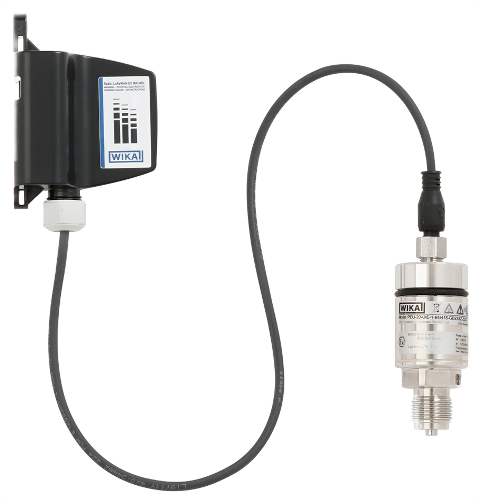
Description of the device
The model PEU-2x in combination with the WIKA model NETRIS®3 radio unit is used wherever web-based remote monitoring of the process pressure of liquids and gases is desired. Typical applications are mobile parts of plants or remote measuring locations. The connection to NETRIS®3 allows for cloud-based process and plant monitoring in industrial applications.
Via retrofit, machinery or moving parts can be smartly configured − without having to plan and document cable routing. Particularly when no continuous measurement is needed, cost advantages can be realised.
The pressure transmitter enables simple condition monitoring. A temperature indication inside the case, in addition to the pressure value, reveals possible malfunctions due to wear or system faults at an early stage and thus reduces the risk of downtime and damage.
The PEU-2x pressure transmitter is part of the WIKA IIoT solution. With this, WIKA offers a holistic solution for your digitalisation strategy.
For more information see product site.
PEU + Netris3 Parser Quick Start
Parser API
All functions are pure (no global mutation) except adjustMeasuringRange which updates internal range configuration for subsequent decodes.
Types:
Input types:
interface UplinkInput {
  bytes: number[] // Raw payload as array of unsigned bytes (0-255)
  fPort: number // LoRaWAN FPort
  recvTime: Date
}

interface HexUplinkInput {
  bytes: string // Raw payload as hex-encoded string (case-insensitive, even length)
  fPort: number // LoRaWAN FPort
  recvTime: Date
}
Return type (shared by all decode helpers):
type Result = {
  data: Record<string, any> // Parsed key/value pairs
  warnings?: string[] // Non-fatal anomalies
} | {
  errors: string[] // Fatal or structural issues only
}
To understand the data field, take a look at the examples and the schema definition.
Supported channels to identify different sensors by:
// Is used in the returned data
type ChannelName = 'pressure' | 'device temperature'
Channels that support adjusting the measurement range:
type AdjustableChannelName = 'pressure' | 'device temperature'Channel Configuration
| Channel Name | Min Value | Max Value | Unit | Configurable |
|---|---|---|---|---|
| pressure | 0 | 10 | bar / psi / MPa | ✓ |
| device temperature | -40 | 60 | °C / °F | ✓ |
decodeUplink(input)
function decodeUplink(input: UplinkInput): ResultdecodeHexUplink(input)
function decodeHexUplink(input: HexUplinkInput): Resultbytes must have even length; case-insensitive.
adjustMeasuringRange(channel, range)
// Will throw on invalid channel name or if the channel disallows range updates
function adjustMeasuringRange(
  channelName: AdjustableChannelName,
  range: {
    start: number
    end: number
  }
): void
Applies to future decodes only.
adjustRoundingDecimals(decimals)
// Smartly adjust number of decimals for rounded values
// Impacts all numeric values in all outputs
// Default is 4
function adjustRoundingDecimals(decimals: number): void
Applies to future decodes only.
encodeDownlink(input)
interface DownlinkInput {
  data: {
    protocol: 'TULIP2'
    input: {
      deviceAction: 'configuration'
      configurationId?: number
      byteLimit?: number
      mainConfiguration?: {
        measuringRateWhenNoAlarm: number
        publicationFactorWhenNoAlarm: number
        measuringRateWhenAlarm: number
        publicationFactorWhenAlarm: number
      }
      channel0?: false | true | {
        alarms?: {
          deadBand: number
          lowThreshold?: number
          highThreshold?: number
          fallingSlope?: number
          risingSlope?: number
          lowThresholdWithDelay?: { value: number, delay: number }
          highThresholdWithDelay?: { value: number, delay: number }
        }
        measureOffset?: number
      }
      channel1?: false | true | {
        alarms?: {
          deadBand: number
          lowThreshold?: number
          highThreshold?: number
          fallingSlope?: number
          risingSlope?: number
          lowThresholdWithDelay?: { value: number, delay: number }
          highThresholdWithDelay?: { value: number, delay: number }
        }
        measureOffset?: number
      }
    } | {
      deviceAction: 'resetToFactory'
    }
  } | {
    protocol: 'TULIP3'
    input: {
      action: 'readRegisters'
    } | {
      action: 'writeRegisters'
    } | {
      action: 'forceCloseSession'
    } | {
      action: 'restoreDefaultConfiguration'
    } | {
      action: 'newBatteryInserted'
    } | {
      action: 'getAlarmStatus'
    }
  }
}

function encodeDownlink(input: DownlinkInput): {
  bytes: number[]
  fPort: number
  warnings?: string[]
} | {
  errors: string[]
}
Validates the input and encodes it into a single downlink frame. It uses the same range configuration as used for decoding. If the documentation refers to percentage values, use the real-world values.
To understand the input structure, refer to the downlink examples.
encodeMultipleDownlinks(input)
// Same input type as encodeDownlink()
function encodeMultipleDownlinks(input: DownlinkInput): {
  frames: number[][]
  fPort: number
  warnings?: string[]
} | {
  errors: string[]
}
To understand the input structure, refer to the downlink examples.
Verifying Ranges
Both channels on the PEU are configurable. You must verify the actual measurement ranges from your device specifications or identification frames. The parser defaults shown in the table above may not match your device configuration.
Using Identification Frames
This device supports both TULIP2 and TULIP3 protocols. Each sends identification frames containing channel configuration:
TULIP3 (Message Type 20):
{
  "data": {
    "messageType": 20,
    "channelId": 0,
    "channelName": "pressure",
    "measurementRangeStart": 0,
    "measurementRangeEnd": 10
  }
}
TULIP2 (Message Type 6):
{
  "data": {
    "messageType": 6,
    "channelId": 0,
    "channelName": "pressure",
    "measurementRangeStart": 0,
    "measurementRangeEnd": 10
  }
}
Use measurementRangeStart and measurementRangeEnd to configure the parser before decoding data messages.
Quick Start
- Check your device's actual measurement ranges from purchase configuration, device specifications, or identification frames (see above)
- If your LNS (LoRaWAN Network Server) is compatible you need to wrap the code in a global function:
function decodeUplink(input) {
  // Replace the placeholder with the corresponding code from the artifact
  var __commonJSMin=(e,t)=>()=>(t||(e((t={exports:{}}).exports,t),e=null),t.exports)

  // Replace values with your device's actual measurement ranges from specifications or identification frames
  adjustMeasuringRange('pressure', { start: 0, end: 10 })

  return decodeUplink(input)
}

function encodeDonwlink(input) {
  // Replace the placeholder with the corresponding code from the artifact
  var __commonJSMin=(e,t)=>()=>(t||(e((t={exports:{}}).exports,t),e=null),t.exports)

  // Replace values with your device's actual measurement range from specifications or identification frames
  return encodeDonwlink(input)
}- Add wrapper function if your network server is non-compliant:
function decode(input) { return decodeUplink(input) }
NPM Module Inclusion
| Device | Included | Factory function |
|---|---|---|
| PEU+NETRIS3 | ✔️ | PEUParser |